Beonbet App: Casino and Sports in Your Phone Browser
The Beonbet app is the brand's mobile site: open beonbet.com in Safari on an iPhone or Chrome on Android to play Beonbet casino online with nothing to download or update. Casino, Sports and Predictions sit under one account, so the login you use on a computer works on the phone too. A home screen icon takes three taps to set up and then opens the site from your phone's start screen.
Mobile site: no APK, no store listing, no updates to install. Sign-up is one form, 18+ only.
Beonbet on mobile at a glance
Native app
None
PWA
None
APK file
None
App Store and Google Play
No listing
Mobile site
Every page mobile-friendly
Is There a Beonbet App to Download?
No. The brand's own FAQ puts it plainly: "there is no mobile app for Beonbet". The site offers no APK file, has no listing in the App Store or Google Play and shows no install banner on a phone. Instead, every page is built to be mobile-friendly and fits most screen resolutions, so the phone gets the same lobby, cashier and sportsbook as a desktop.
Files called "Beonbet APK" on other websites do not come from beonbet.com, because the brand publishes no download at all. Do not install them or type your password into them: a login form inside an unknown app can pass your details to whoever made it. The address beonbet.com, typed into the browser, is the only official way in.
iPhone: Put Beonbet on the Home Screen With Safari
Safari can save any website as an icon, and that is the closest thing to a Beonbet app on iOS. Three taps do it once the site is open:
Open beonbet.com in Safari
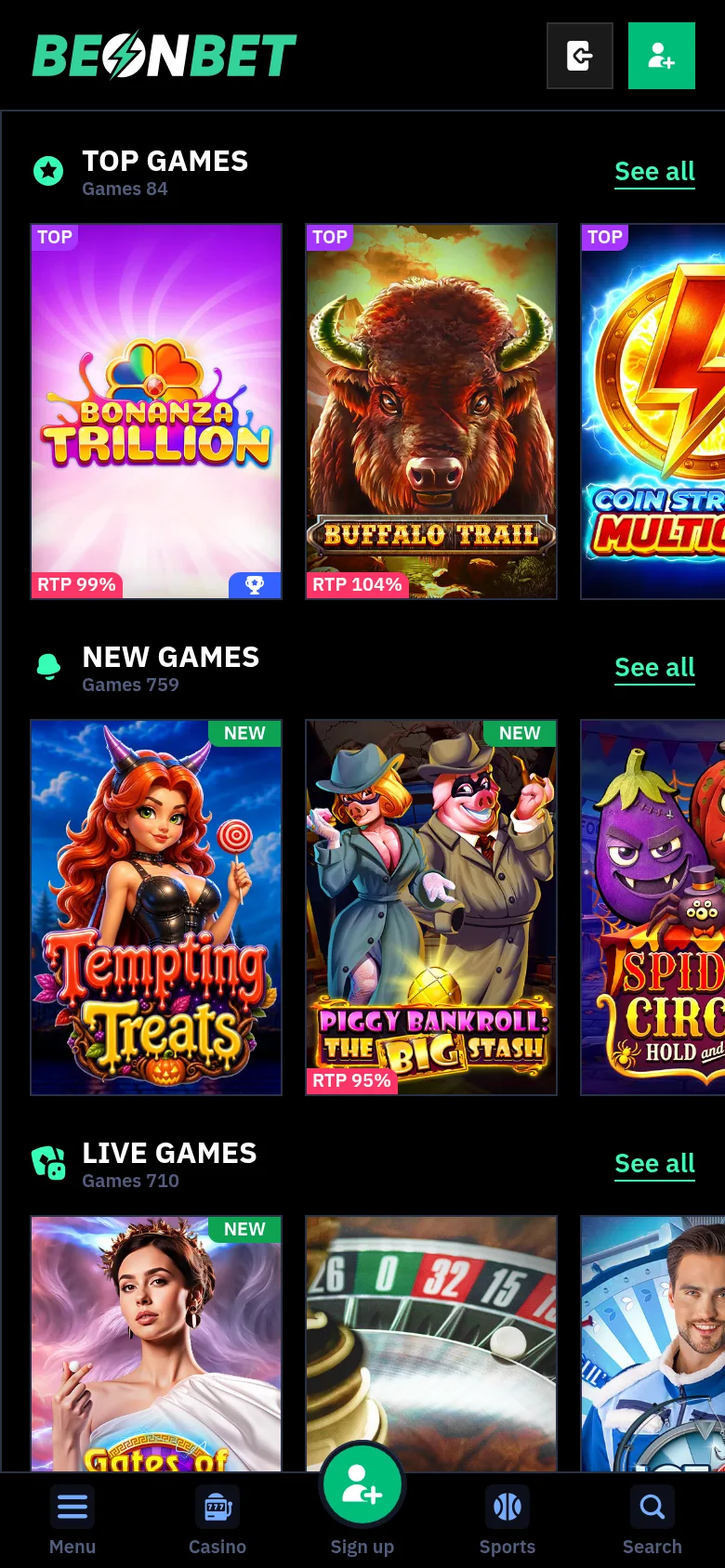
Open beonbet.com in Safari and wait for the home page with the Top games shelf.
Tap Share
Tap the Share button, the square with an arrow, in the Safari toolbar.
Choose Add to Home Screen
Choose Add to Home Screen from the list of actions.
Name it and tap Add
Keep the name Beonbet or type your own, then tap Add.
The icon lands next to your other apps and opens the site in Safari with a tap. Because it is a link rather than a program, there is nothing to update: changes on beonbet.com appear the next time you open it. The site has no offline mode, so the icon needs a Wi-Fi or mobile data connection.
Android: A Chrome Shortcut Without an APK
On Android phones the same result comes from Chrome, and no file or "unknown sources" setting is involved. Four actions put the icon on the screen:
Open beonbet.com in Chrome
Open beonbet.com in Chrome.
Open the menu
Tap the three-dot menu in the top right corner.
Pick Add to Home screen
Pick Add to Home screen.
Confirm with Add
Confirm with Add, or drag the icon to the spot you want.
A tap on the shortcut opens Chrome on the Beonbet home page. Beonbet publishes no system requirements, because nothing is installed beyond the icon and Chrome does the rest.
The Bottom Bar and Menu on a Phone Screen
On a phone, the left sidebar of the desktop site folds away and a bar along the bottom of the screen takes over. It holds five buttons:
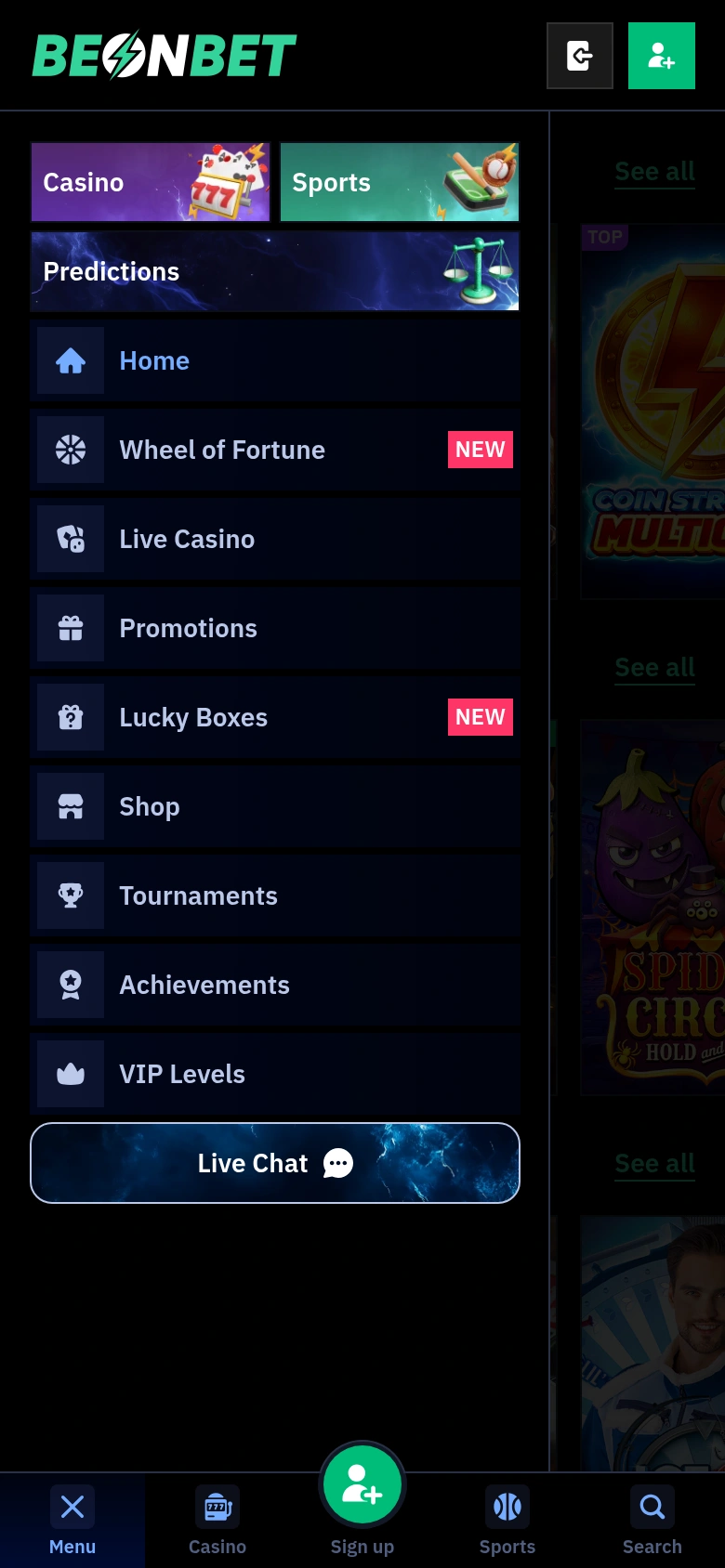
Menu, which opens the full list of sections;
Casino, for the game lobby;
Sign up, which opens the account form;
Sports, for the sportsbook;
Search, at the end of the bar.
The home page stacks the Top games, New games and Live games shelves one under another. Inside Menu, the Casino, Sports and Predictions tabs come first, then Home, Wheel of Fortune, Live Casino, Promotions, Lucky Boxes, Shop, Tournaments, Achievements, VIP Levels and Live Chat. Wheel of Fortune and Lucky Boxes ask you to sign in first.
Phone or Computer: What Changes and What Stays
The account, balance and offers stay the same on both screens; only the way you reach them moves. The table shows the main differences:
Phone browser compared with a computer
Part of the site
Phone browser
Computer
Main sections
behind Menu in the bottom bar
left sidebar, always visible
Signing in
Sign up in the bottom bar, then the Login tab
Sign in in the header
Casino and Sports
Casino and Sports buttons in the bottom bar
tabs at the top of the page
Live Chat
last item in Menu
last item in the sidebar
Installation
none, optional home screen icon
none
One sign-in covers both, so a session started on a laptop can be picked up on the phone with the same login and password.
Sign Up and Log In From Your Phone
Tapping Sign up in the bottom bar opens the account form, with Login and Sign Up tabs at the top. Sign Up asks for an email, a password of at least 8 symbols, your country and the account currency, plus the required 18+ box. Phone number, name and date of birth are left out at this stage. The email promotions box is ticked in advance, so clear it if offers by email are not wanted. Returning players log in to Beonbet through the Login tab with the same email or login and password they use on a computer.
Slots, Live Tables and Sports on a Small Screen
Casino lobby
The casino lobby on a phone keeps the same tabs as on a desktop, from Lobby, Hot, New and Top through Slots, Live Casino and Table Games to Jackpot, Instant Games, Bonus and Tournaments, with Select provider and Select collection filters underneath. Slots carry a Demo button next to Play, so a game can be tried before you deposit, while live games mostly offer Play only. Live tables come from studios such as Evolution, Pragmatic Live and Winfinity.
Sportsbook
The sportsbook splits into Sports, Esports and Racing, and the Predictions tab sits beside them. Among football leagues, the Premier League, LaLiga and Serie A are featured. The Betslip has a QUICK BET toggle, a live betting icon sits in the sportsbook bar, and Cash Out settles a bet before the event ends.
Deposits, Bonuses and Withdrawals on Mobile
The cashier opens from your account after sign-in, on a phone as on a computer. Visa and Mastercard are the logos the brand shows; other methods depend on your country and appear in the cashier.
Beonbet bonuses work the same way on a phone: the welcome offer is credited automatically after a qualifying deposit and shows in your profile. There is no separate mobile-only offer on the promotions list. If a bonus is missing, message Live Chat before placing a bet, because betting the deposit first cancels it.
To request a withdrawal for the first time, you need ID, proof of address, proof that the payment method is yours and card pictures or a bank statement. Photos taken on the phone can be emailed to KYC@beonbet.com, and once checks pass, payouts are normally processed within three banking days to the method you deposited with.
Live Chat Help Without Leaving the Phone
Live Chat is the last item in Menu and the one channel open 24/7. The chat starts with a three-field form: your name, your email and the reason for contact, picked from seven topics such as Withdrawal, Documents or Complaint. Written questions go to support@beonbet.com, and verification papers to KYC@beonbet.com; there is no phone line. Players at VIP level 3 and above get a personal manager through VIP Live Chat, also 24/7.
Who Runs Beonbet and Where the Mobile Site Opens
Beonbet belongs to 3-102-944465 SRL, a Costa Rica company licensed by the Tobique Gaming Commission under number 0000175. The United Kingdom is on the restricted list in section 2.1.2 of the terms, and the site shows UK connections a "Country blocked" message. Section 9.3 warns that hiding a location with a VPN can lead to a blocked account and a lost balance.
18+ only. Deposit limits, cooling-off from 24 hours to 3 months and self-exclusion are among the account tools; if you have self-excluded through any scheme, do not sign up. Gambling can be addictive, play responsibly. Free, confidential support: National Gambling Helpline 0808 8020 133.
Phone and Tablet Questions
Does the mobile site work on a tablet?
Yes. Beonbet builds its pages for most screen resolutions, so an iPad or an Android tablet opens the same site in Safari or Chrome. The home screen icon can be added on a tablet in the same way as on a phone.
Is there a bonus for playing on mobile?
Not a separate one. The Starter Pack, the Sunday free spins and the Cashback Boost run on the same terms whichever device you deposit from, and each shows in your profile on every screen.
Can I try slots for free on my phone?
Most slots have a Demo button beside Play, and it works in the phone browser as well. Live dealer games usually show Play only, so they are played with real money from your balance.
How can I keep my account safe on a shared phone?
Switch on two-factor authentication in the account settings, which adds a second check at login. Log out after each session and do not let the browser store your password on a phone that other people use.
How do I remove the home screen icon?
Touch and hold the icon, then choose the delete or remove option your phone offers. This only removes the shortcut: your account, balance and bonuses stay as they are and open again from beonbet.com in the browser.